
Custom GPT
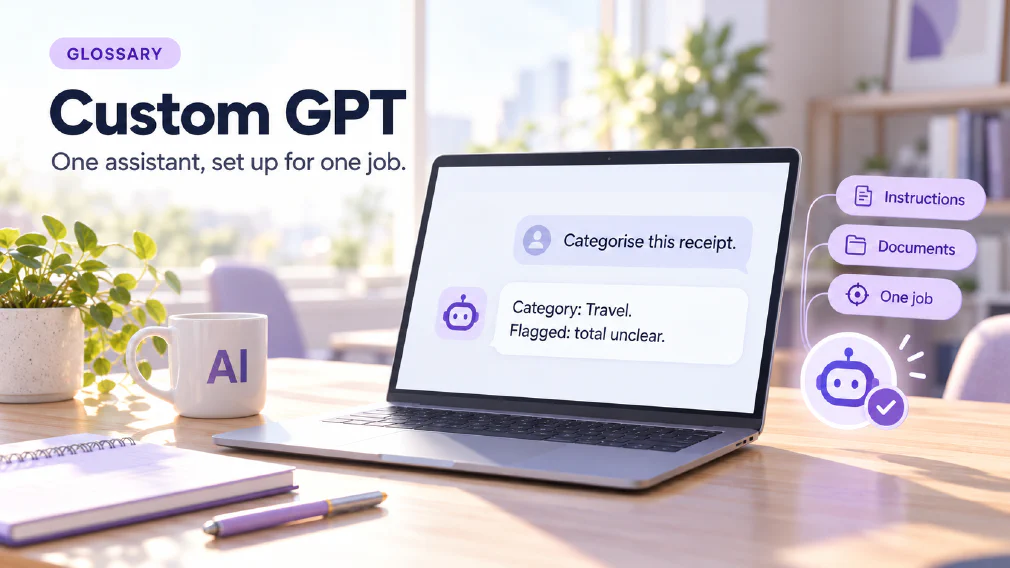
A version of ChatGPT set up for one recurring job, with its own instructions and, where needed, its own documents. It lets repeatable work be handed to a ready-made assistant instead of rewriting the same prompt each time.
What a Custom GPT is
A custom GPT is a version of ChatGPT set up for one recurring job. It carries its own instructions and, where the job needs them, its own documents. Whoever opens it starts with an assistant that is already briefed, instead of a blank chat box.
The site’s definition puts the idea in one line: repeatable work is handed to a ready-made assistant instead of rewriting the same prompt each time. The ChatGPT page describes the same thing from the other side. A custom GPT is an assistant that holds a role and a set of rules, so the person using it does not have to write the brief each time.
This page covers what goes into one, how it differs from the saved-prompt options sitting next to it, the five assistants the courses build, how to tell whether a job is worth the effort, and what to keep out of it.
The Prompt you stop rewriting
Most people who use ChatGPT for work end up typing the same opening again and again. The role they want the tool to take, the tone, the format, the rules it must follow and the things to avoid are retyped from memory, and the version typed on a busy afternoon is worse than the one typed on a calm morning.
The prompt page describes a good request as having several parts. The AI brief page says that most disappointing answers come from missing context and not from poor wording. A custom GPT is one way to stop paying that cost twice. The context is written once, carefully, and kept inside the assistant. After that the person using it supplies only what changes: this email, this receipt, this question.
The ChatGPT Enterprise course states the takeaway directly. Participants leave able to hand repeatable work to a custom GPT instead of rewriting the prompt each time.
Instructions and Documents
The definition names two things a custom GPT can carry, and they do different jobs.
The first is instructions. These say what the assistant is for, how it should answer, what format to use and what to refuse or flag. They are the same material a good brief contains: role, goal, context and constraints. If the instructions are vague, the assistant is vague. A custom GPT does not make weak instructions stronger. It only saves them from being retyped.
The second is documents, where the job needs them. A job that depends on the organisation’s own material, such as a staff handbook or a style guide, cannot be done from general knowledge. Giving the assistant that material lets it answer from the source and not from a guess. The grounding page covers why that matters: a tool tied to a specific set of source material has far less room to invent an answer.
Many useful assistants need only the first. A communication coach or a prompt-improving assistant works from instructions alone. The documents come in when the answer has to match something the business owns.
Custom GPT, saved Prompt and Custom Instructions
There are three ways to stop repeating yourself, and they are easy to confuse.
A prompt library is the lightest. It is a kept set of prompts that have already worked, which you choose from and paste. Nothing is built. The person still decides which prompt to use and supplies it.
Custom instructions are standing rules that apply to your requests in general. They are set once and sit behind every conversation. They suit things that are true of all your work, such as your role, your preferred spelling and the tone you want by default. They are not tied to one job.
A custom GPT sits between the two and goes further than both. It is built for one job, holds that job’s role and rules, can carry its own documents, and is opened on purpose when the job comes up. Nobody pastes anything, and the rules do not leak into unrelated chats.
The memory feature is a fourth thing that is sometimes mistaken for these. Custom instructions are written by you and stay fixed. Memory is kept by the tool and changes as you use it. A custom GPT is neither: it is a configured assistant for a task.
Five Assistants worth building
The ChatGPT Enterprise course works through five assistants. They show the range of jobs where a custom GPT earns its place.
An AI prompter rewrites a rough message into a stronger prompt. It is the most direct example of the idea, because the assistant’s whole job is the brief.
An HR assistant answers from the staff handbook. This is the grounded example. The questions recur, the answers live in a document the business owns, and a wrong answer matters.
An expense categorisation assistant sorts spending against a set of rules. The task recurs, follows rules and has a checkable output.
A communication coach reviews your writing and gives feedback in your own style. It is built on instructions describing the standard to hold writing to.
A simulator lets someone practise a difficult conversation. The assistant holds a role, plays it consistently and stays in it, which is exactly what a one-line prompt struggles to do.
Each of these is a task that comes round again and follows rules. That is the pattern worth noticing, and the next section turns it into a test.
When one is worth building
The advanced course asks when a custom GPT is worth building, and the answer is not “always”. A custom GPT is not the answer to every repeated task.
The signs that a job is a good candidate follow from the examples above. The job comes round often. It follows rules that can be written down. The instructions are the same every time. The result can be checked. And more than one person, or the same person on many occasions, will use it.
The signs that it is not worth the effort are the reverse. The job happens rarely, the rules change each time, or the task is really a one-off conversation. Building an assistant for a job that comes up twice a year costs more than it saves.
The same course sets this against a second question, which is where a saved prompt is enough.
Where a saved Prompt is enough
The lighter option is often the right one. If a job needs one good prompt, a shared place to find it and a person to choose it, a prompt library does the job with nothing to build and nothing to maintain.
The site’s guidance throughout is to use the lightest option that works. A saved prompt comes first. Custom instructions come next for what is true of all your work. A custom GPT comes when a job is frequent enough, and rule-bound enough, that holding the whole set-up in one assistant is worth it. The AI agent page describes what lies beyond: the more an assistant acts on its own with tools, the closer it moves to a fuller agent. A custom GPT is a small agent only in the loosest sense, and it does not act on its own.
Grounding a Custom GPT in your own Documents
The HR assistant is the clearest case. Staff ask the same kinds of question about leave, expenses and policy. The answers are written down in the handbook. An assistant that answers from the handbook is useful. One that answers from general knowledge is a risk, because it sounds equally confident and may be wrong about this business.
The courses teach why the source behind an answer matters as much as the answer. A grounded assistant should be able to point to where its answer came from, so the person asking can verify it. That habit is part of what makes a custom GPT trustworthy enough to use.
The retrieval-augmented generation page explains the technique behind this in more detail. For most business uses, the practical point is simpler: give the assistant the real document, and ask it to quote from it.
What to keep out of a Custom GPT
A custom GPT is not a private room. The safe-to-paste article makes three points that apply directly.
Account type matters more than brand. The same assistant behaves differently under a personal login and under a business agreement, and the difference lies in where data goes, how long it stays and who can read it. Check which account the assistant is built on before anything sensitive goes near it.
A file carries everything in it. A spreadsheet uploaded for a quick summary carries every row and column, hidden ones too. Trim the file first, or copy only what the task needs. The same applies to documents given to an assistant to answer from.
Saved material can come back. Memory features, saved instructions and connected folders mean a detail typed once can surface later in a different conversation. Keep customer details out of the instructions themselves.
Anything the article places in its red tier, such as passwords, payment details or health information, stays out of general AI tools however the assistant is set up. The data protection page covers the wider rules.
A Custom GPT still needs a Human check
A ready-made assistant is consistent, which is different from being correct. The expense assistant applies its rules the same way every time, including when a rule is wrong for an unusual receipt. The HR assistant answers from the handbook, but a handbook can be out of date.
The hallucination page explains why a confident answer can still be wrong. The human in the loop page covers the answer: a person judges the result, and the more the answer matters, the more closely.
An illustration, not a case study. A team builds an assistant that sorts expense lines into categories. In the first weeks, someone reads every sorted batch. Where the assistant gets a category wrong, the instructions are corrected. Over time the review narrows to the lines the assistant flags as unclear. The assistant saves the typing, and the person keeps the judgement.
Mix-ups worth avoiding
Four confusions come up often enough to name. The first is treating a custom GPT as the answer to every repeated task, when a saved prompt is often enough. The second is treating it as the same thing as custom instructions, which apply to all your requests and not to one job. The third is assuming a custom GPT is accurate because it is consistent. The fourth is putting sensitive material into one without checking the account it sits under.
How we use it
Custom GPTs close the ChatGPT Enterprise course: what a custom GPT is, when to build one, and five worked examples, among them expense categorisation and a simulator agent. The ChatGPT Enterprise Essentials course runs over two half days, and the second session is practical throughout.
If your team repeats the same few jobs and cannot tell which deserve an assistant, a discovery call is a quick way to find out.
Sources
- ChatGPT Enterprise Essentials: what a custom GPT is, when to build one and the five worked examples.
- ChatGPT: custom GPTs as assistants that hold a role and a set of rules, and the courses’ builds.
- Custom instructions and prompt library: the difference between standing rules, saved prompts and a custom GPT.
- Grounding: answering from the organisation’s own documents.
- Customer data and AI tools: what is safe to paste?: account type, files carrying every row and column, and saved material coming back.
FAQ
Questions about Custom GPT
What is a Custom GPT?
A version of ChatGPT set up for one recurring job, with its own instructions and, where the job needs them, its own documents. The courses describe it as an assistant that holds a role and a set of rules, so the person using it does not write the brief each time.
What is a Custom GPT used for?
For a recurring task that needs the same instructions every time. The ChatGPT Enterprise course works through five examples: an AI prompter, an HR assistant, expense categorisation, a communication coach and a simulator for practising difficult conversations.
When is a Custom GPT worth building?
When the same job comes round often, follows rules and needs the same instructions each time. The advanced course asks the question directly and also asks where a saved prompt is enough, so a custom GPT is not treated as the answer to every repeated task.
Is a Custom GPT the same as Custom Instructions?
No. Custom instructions are standing rules applied to your requests in general. A custom GPT holds a role and a set of rules for one job, and can carry its own documents. One shapes every conversation you have, the other is a tool you open for a particular task.
Is a Custom GPT the same as a Prompt Library?
No. A prompt library is a kept set of prompts you choose from and paste. A custom GPT is an assistant that already holds the instructions, so nobody pastes anything. The prompt library is the lighter option, and the site's guidance is to use the lightest one that does the job.
Can a Custom GPT Answer from our own Documents?
Yes, where it is given them. The courses build an HR assistant grounded in the staff handbook, which answers from the organisation's own file and not from general knowledge. Without documents, a custom GPT answers from what ChatGPT already knows and from what is typed into the chat.
Is it Safe to put company Documents into one?
It depends on the account and on what the files contain. The safe-to-paste article says account type matters more than brand, and that a file carries every row and column, hidden ones too, so trim it first. Anything in the red tier stays out of general AI tools however the assistant is set up.
Customer Data and AI Tools: What is Safe to paste?Data Protection
Which Course covers Custom GPTs?
ChatGPT Enterprise Essentials, which runs over two half days. Custom GPTs are part of its syllabus, with what one is, when to build one and five worked examples. The second session is practical throughout.
What it means for a Business
A custom GPT is not the answer to every repeated task. The ChatGPT Enterprise course covers what one is and when it is worth building.
Ready to Put This to Work?
Tell us where your team is with AI and we will tell you honestly what would make the biggest difference.